Dynamic Orchestration: A New Era of Multi-Step AI Workflows


Artificial intelligence is rapidly transforming the way we solve complex problems, from conducting research to running advanced simulations. If you’ve used cutting-edge AI agents from You.com like Research, Compute, or ARI, you might have noticed how they can handle multi-step tasks on your behalf.
But until recently, these workflows were a bit like following a recipe: every step was pre-set, and there wasn’t much room for improvisation or adaptation.
A major update to our multi-step AI (MAI) framework is changing that. Let’s break down what’s new, why it matters, and how it’s creating a more human-like, transparent, and efficient AI experience.
From Rigid to Dynamic: The Old vs. New MAI
The Old Way: Fixed in Stone
Previously, MAI workflows always followed the same rigid pattern:
- Step 1: Create a full, detailed plan from your query.
- Step 2: Run all research objectives in parallel, even if some weren’t needed yet.
- Step 3: Do any computations only after all research is complete.
- Step 4: Synthesize the final answer.
No matter what the task was—whether you were asking about market trends or running a simulation for a company—the system would strictly adhere to this sequence. For example, if you wanted to simulate a company’s performance, it would research every detail about the company first, even if the company didn’t exist. There was no way for the AI to adapt its plan as new information surfaced.
The New Way: Dynamic Workflow Orchestration
Now, You.com is introducing dynamic workflow orchestration, allowing our MAI to make decisions on the fly. This is powered by:
- Adaptive Step Selection: Instead of following a fixed order, the agent (Research, Compute, or ARI) chooses the next best step based on what it’s learned so far. For example, it might first check if a company exists before wasting time researching its financials.
- Integrated Research + Compute: The boundaries between research and computation are gone. The agent can now mix research and calculations in real time, responding to what it discovers along the way.
- Reflection Between Steps: After each step, the agent “reflects” on the results, adjusts its plan, and decides what to do next. This is much closer to how a human would approach a complex task.
How Does Dynamic Workflow Orchestration Work?
Let’s say you ask: “Run a simulation for [company].”
Old Workflow:
Plan → Research all company details in parallel → Run compute step → Produce final answer.
New Dynamic Workflow:
Create plan → Research company → Once identified and confirmed, research financials → Reflect → Run compute simulation with intermediary information → Complete additional required research -> Synthesize final answer.
The new system doesn’t waste time or resources chasing unnecessary information. It only digs deeper when it makes sense, and it can adapt if it finds any surprises along the way.
Why is This Important?
1. Smarter, More Targeted Results
Dynamic workflow orchestration means the system only does what’s needed for your specific question. No more “researching research” or running computations that aren’t relevant. This leads to better, more precise answers.
2. Transparency and Human-Like Reasoning
You’ll notice a more natural flow in how results are shared. The agent’s reasoning—how it reflects on findings and adjusts its approach—is visible to you in the interface. It’s like watching a thoughtful colleague think through a problem step by step, rather than waiting for a black-box result.
3. Efficiency (With a Twist)
By skipping unnecessary steps, the system can be more efficient. However, it also means workflows might sometimes take a bit longer overall, since the agent pauses to reflect and make decisions between steps. But the payoff is that you get more relevant, informed results.
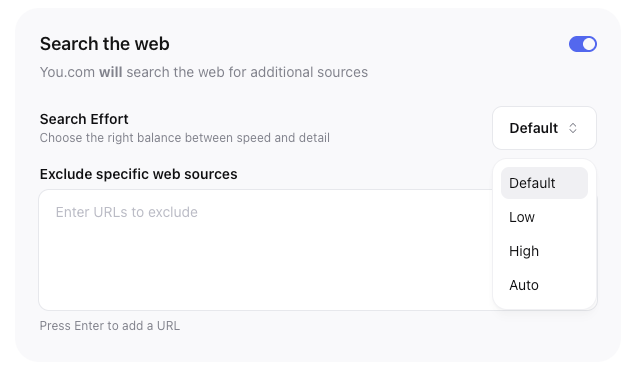
Coming soon: A depth and speed dropdown is being rolled out to allow users to determine which matters more: speed or accuracy. This way, if needed, the system can deliver faster results.
4. Integrated Research and Compute
Previously, complex agents like ARI could only do research or computation, not both in one go. Now, these can be seamlessly interwoven, unlocking richer and more complex workflows.
How Our Dynamic Workflow Orchestration Performs in Benchmark Evals
To understand the impact this change has on the accuracy of our complex agents, we ran evals across three different SOTA industry benchmarks: GAIA, DS Bench, and FRAMES. In each test we compared our ARI and Compute advanced agents both before and after dynamic workflow orchestration.
- FRAMES
- ARI accuracy increased from 75.3% to 79.6% (+4.3%)
- Compute accuracy increased from 73.5% to 76.8% (+3.3%)
- DSBench
- ARI accuracy increased from 47.6% to 52.4% (+4.8%)
- Compute accuracy increased from 46.2% to 55.0% (+8.8%)
- GAIA
- ARI accuracy increased from 49.0% to 53.1% (+4.1%)
- Compute accuracy increased from 44.4% to 51.9% (+7.5%)
It’s evident—across all benchmarks—that our dynamic workflow orchestration increases accuracy for both ARI and Compute.
What’s Changed in the User Experience?
- More visible steps: You’ll now see not just research objectives, but also compute and other steps, each of which can be expanded in the workflow UI.
- Reflection steps: The agent’s thought process can pause, and reflect to ensure the plan is best-suited to accomplish the task at hand.
- No more silos: Research and computation flow together naturally, just as they do in real-world problem-solving.
The Big Picture: A Smarter, More Transparent AI
This update is a big leap forward for our advanced agents. Moving from mechanical, pre-set workflows to truly adaptive, reflective processes results in agents that work more like humans: thinking, learning, and adjusting as they go. You get answers that are better targeted and more trustworthy.
If you want to see the difference for yourself, try running a complex research or simulation task in Research, Compute, or ARI—and compare it with how things worked before. You’ll notice a more conversational, transparent, and intelligent AI experience. That’s the future of multi-step AI—unified, adaptive, and always learning.
Want to share your feedback?
Test out our new unified MAI and let us know what you think.
LI Test
LI Test
Share Article:
Related resources.
.jpg)
Knowledge: Live Stock Prices, Sports, Crypto, And More. Now In Web Search. Same $5 CPM.
September 23, 2026
Product Updates

The n8n You.com Node Now Has 7 Operations, Including Background Research
September 10, 2026
Product Updates

Web Search with Highlights: 95.17% on SimpleQA, 35% Cheaper Than Claude's Built-In Search.
September 1, 2026
Product Updates
Introducing the You.com Answer API: Grounded, Cited Answers Powered by Real-Time Web Search
August 5, 2026
Product Updates

The You.com Research API Frontier Tier Reaches a New Level of State-of-the-Art Performance
July 22, 2026
Product Updates