Introducing the You.com Extract API: fetch and parse any URL, with 80% higher accuracy on PDFs

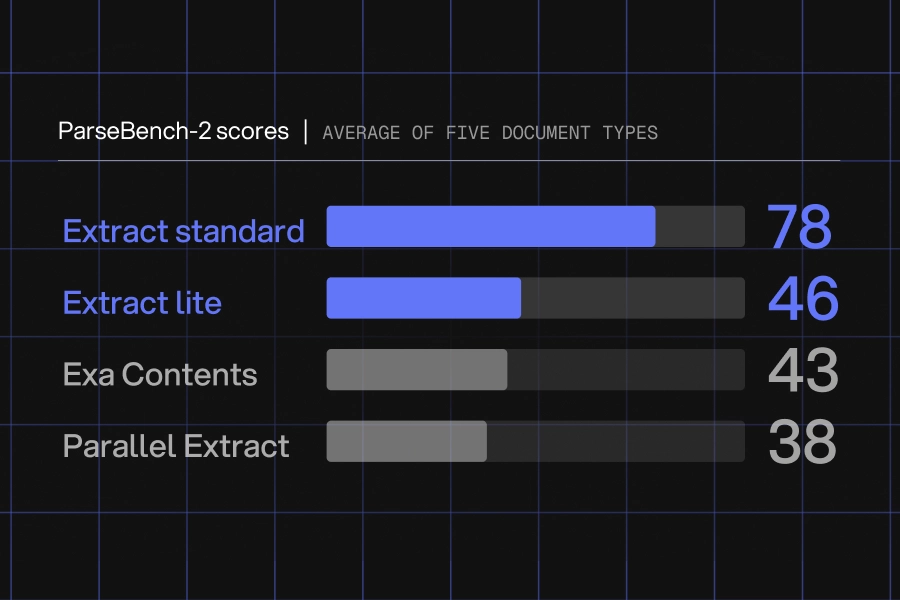
TL;DR: The You.com Extract API takes a URL, fetches the web page or PDF, and returns markdown or HTML. On PDFs, the default parse_effort=standard recovers the tables, charts, forms, and scanned pages that text-only parsers miss. On ParseBench-2, averaged across five dimensions, Extract scored at least 80% higher than Exa Contents and Parallel Extract. With parse_effort=lite, every URL, web page or PDF, costs a flat $0.90 per 1,000; standard adds $0.50 per 1,000 PDF pages. Try Extract in the playground
Where Extract fits
Use Extract after web search when your agent needs the full document instead of snippets or highlights, or use it on its own when you already have the URL. For PDFs, parse_effort sets how much parsing Extract does; web pages aren’t affected. The default setting, standard, is built for complex PDF workloads: 10-Ks and earnings reports, court filings, and scientific papers. For sensitive documents, zero data retention is available at no extra cost. Talk to an engineer to enable it.
Extract returns web pages and PDFs as markdown or HTML. By default, it serves our cached copy when we have one, which is faster, and fetches live when we don't; set extraction_source=fetch to always get the live page.
What's different for PDFs
Text-only parsers struggle with PDFs because they can't interpret tables, charts, forms, or scanned pages. parse_effort=standard sends those pages through a deeper parsing pass. We picked four pages from ParseBench-2 and ran each through You.com Extract, Exa Contents, and Parallel Extract. The outputs below are unedited; the scores across every ParseBench-2 page are in the next section.
Each example links to the same page in the playground, so you can run it yourself; new accounts get free credit.
Tables come back as tables
Extract returns markdown or HTML tables with rows and columns intact.
From Deutsche Bank's 2025 annual report, a liquidity risk table with eight columns:
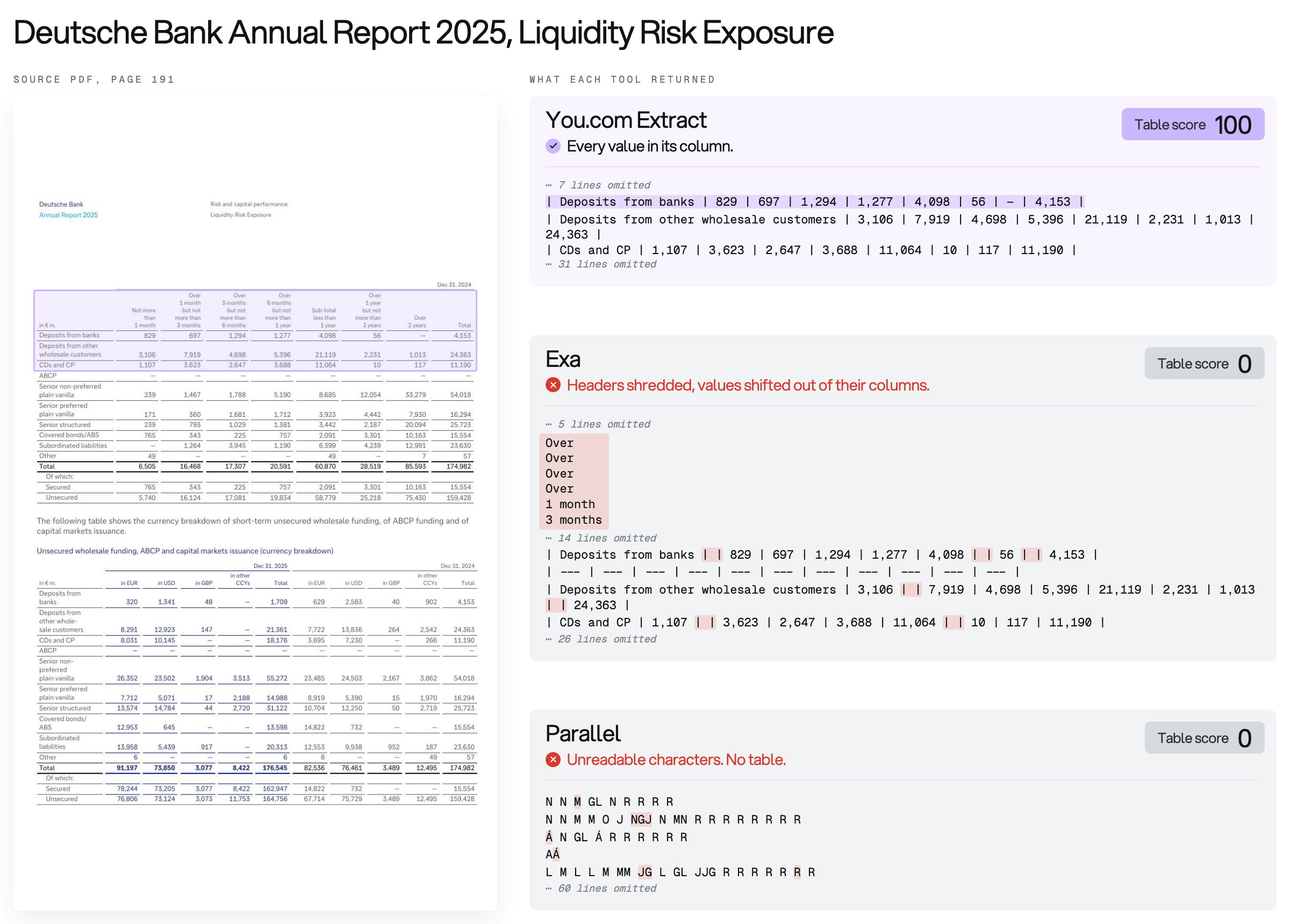
Extract returned both tables on the page, every value in its column, and scored 100. Exa broke the column headers into loose fragments and shifted values one column off their headers. Parallel returned unreadable characters and no table. Both scored 0.
Run this example in the playground →
Charts come back as data
PDFs store a chart as a drawing, often with no numbers printed on it, so Extract reads each bar against the chart's axes and estimates its value.
From the IEA's Clean Energy Market Monitor (March 2024): six bar charts comparing 2022 and 2023, with no data labels on the bars.
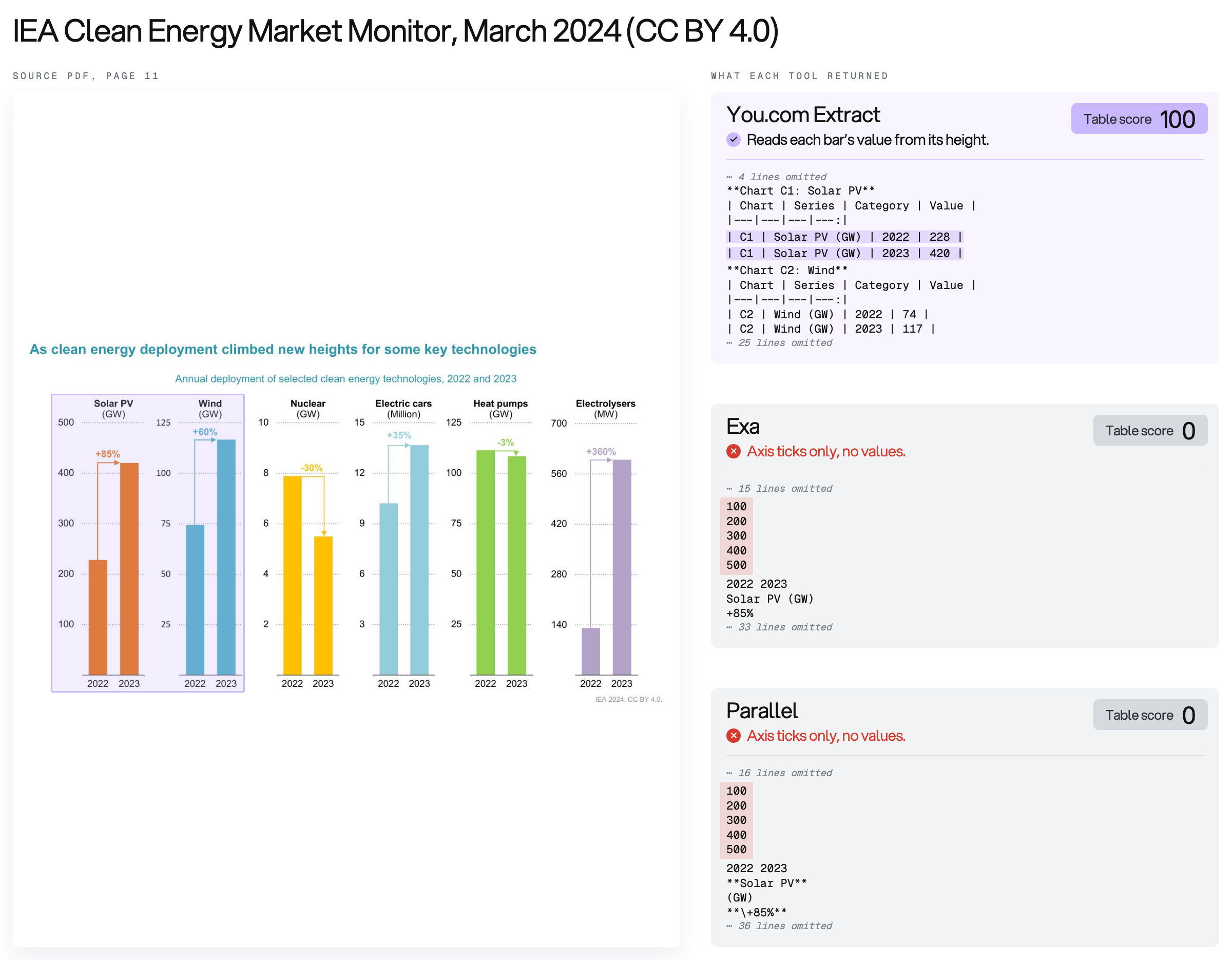
Extract returned a table for each chart, with all 12 values, and scored 100. Solar PV, for example, came back as 228 GW in 2022 and 420 GW in 2023. Exa and Parallel returned the axis ticks and percent labels with no bar values, and scored 0.
Run this example in the playground →
Forms keep their checkboxes
From a USCIS Form N-600 filled with test data (it isn’t a real person’s application), where “This Parent is My:" has Father checked:
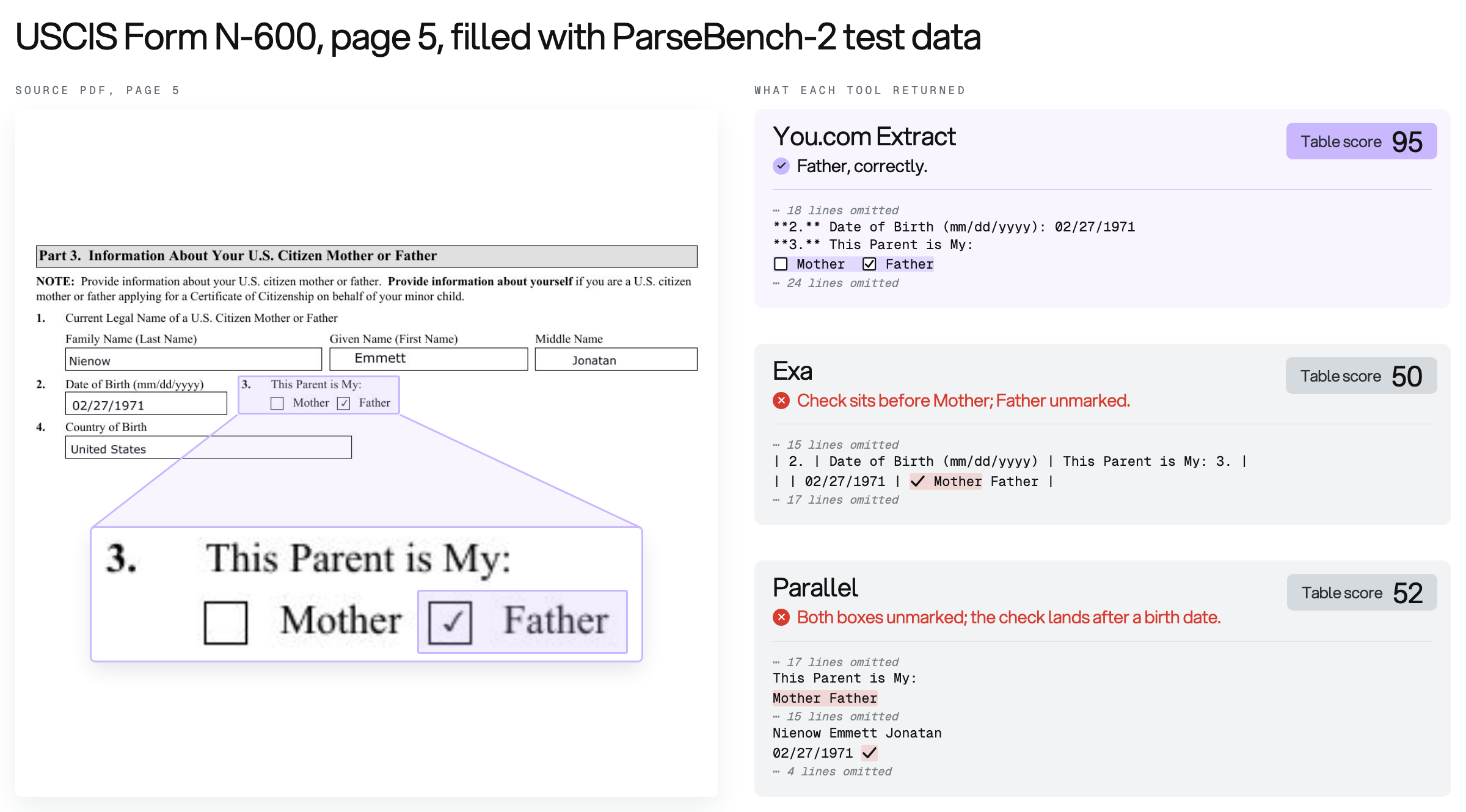
Extract returned the check next to Father and scored 95. Exa put the check before Mother and left Father unmarked, which reads as the wrong answer, and scored 50. Parallel detached the check from the question and attached it to a birth date, and scored 52. The score gap is smaller than in the other examples, but an agent reading Exa's or Parallel's output would record the wrong parent.
Run this example in the playground →
Scanned pages come back as text, even handwriting
From a photographed page of handwritten Czech lecture notes on double integrals:
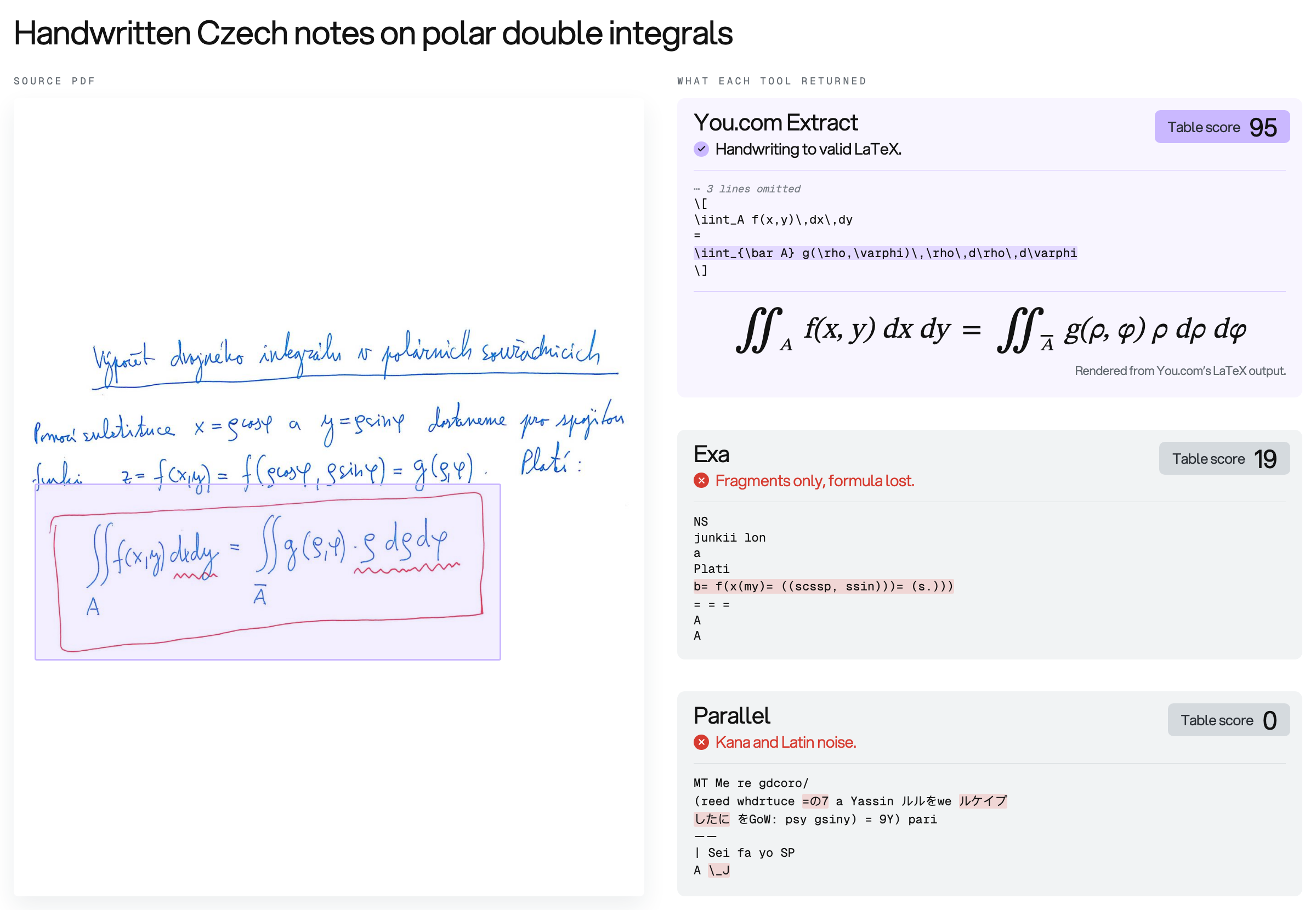
Extract returned the boxed formula as LaTeX that renders, and scored 95. Exa returned fragments without the formula (19), and Parallel returned Japanese characters mixed with Latin noise (0).
Run this example in the playground →
Each tool's raw output for all four pages →
How Extract compares
LlamaIndex released ParseBench-2, its public benchmark for PDF parsing, on November 12, 2026. We compared You.com Extract, Exa Contents, and Parallel Extract on ParseBench-2: 3,782 pages in 12 sets, scored in five dimensions. Each tool fetched the same URL for every page, and all outputs were scored with ParseBench’s own grader. Documents that the tool failed to return received a score of zero. Extract has two settings, standard (the default) and lite.
*Parallel's minimum cache age is 600 seconds, so some of its responses may have been served from cache.
You.com Extract standard scored highest on all five dimensions. Averaged across them, it scored 78.6, against 43.2 for Exa Contents and 38.3 for Parallel Extract: 80% higher than Exa and twice as high as Parallel. The biggest gaps are in tables and charts, where Exa scored 22.8 and 0.9, respectively, and Parallel returned almost nothing.
Every ParseBench-2 PDF is a single page. Real-world PDFs are longer: across the billions of PDFs we've processed, the median is 26 pages. The last row in the table shows the cost of that typical document length. On standard, 1,000 of these PDFs cost $13.90: $0.90 for the URLs, plus $13.00 for 26,000 pages at $0.50 per 1,000.
Exa Contents and Parallel Extract charge $1.00 for the same 1,000 PDFs, because they bill per URL regardless of length. On the five-dimension average, both score lower than standard and lite. For text-based PDFs, use lite: $0.90 per 1,000 URLs, less than Exa and Parallel, with no per-page fee. Web pages cost the same $0.90 on either setting.
Another approach is to fetch using open source tools and then use dedicated PDF parsing tools like LlamaParse. With this approach, parsing alone costs $97.50 per 1,000 26-page PDFs on LlamaParse’s Cost Effective tier, or $325 on Agentic, before the cost of fetching them. LlamaParse scores higher on ParseBench-2; Extract fetches and parses in one call for $13.90.
We excluded ParseBench-2’s layout evaluation because it measures the coordinates of elements on a page. Extract only returns parsed content as markdown or HTML, so this metric isn’t applicable.
Choosing a parse_effort
parse_effort only affects PDFs: it sets how much work Extract does on each PDF page. Web pages return the same output at the same price on either setting.
standard (default) sends PDF pages through a deeper parsing pass, so tables, charts, and images come back structured.
lite returns the text embedded in each page, without the deeper parsing pass.
standard is the default because it handles every kind of document, and its per-page fee applies only to PDFs, so you pay the same rate as lite for web pages.
The per-page PDF fee applies when the fetched document's MIME type is application/pdf.
For Contents API users
The Contents API remains supported for existing users, but it's no longer in active development. New capabilities, including deeper PDF parsing and parse_effort, ship only on Extract.
Get started
Install the official You.com MCP server to use Extract on web pages (and web search) for free, with no key or authentication required.
Using an agent? Use the official skill: you.com/SKILL.md
To call the API directly, sign up for $10 in free credit, or $100 with a work email: enough for about 7,000 typical 26-page PDFs on standard.
Request and response
Here’s an excerpt of the response. Each checkbox comes back next to its option ("…" marks omitted content):
The extraction_source field tells you where the content came from: cache if we already had a copy, fetch if we retrieved it live.
Requests that fail on our side are not billed. Error codes specify whether the URL was blocked, the request failed, or the page had no content, so your pipeline can decide whether to retry.
Ready to try Extract? Go to the playground · Read the docs
LI Test
LI Test
Share Article:
Related resources.

How to Feed Real-Time Data to an LLM with the You.com Web Search API
October 9, 2026
Blog

How to Parse Search Results JSON in Python with the You.com Web Search API
October 9, 2026
Blog

How to Retrieve Version-Specific Library Docs with the You.com Web Search and Contents APIs
October 9, 2026
Blog

How to Work Around LLM Knowledge Cutoffs with the You.com Web Search API
October 9, 2026
Blog

How to Get Search Results Programmatically with the You.com Web Search API
October 8, 2026
Blog