

TLDR: You.com is now live as a connector in Merge Agent Handler, the platform Merge built to connect AI agents to third-party tools over MCP.
The connector exposes nine You.com tools, covering live web search, page content extraction, cited answers, multi-step research, finance research, and image search. This goes further than our existing Merge integration, where You.com is available as the Merge Gateway web search tool.
In Agent Handler, You.com is a named connector that companies can offer inside their own products without building a separate integration. Users bring their own You.com API key, and Merge handles authentication, credential storage, data-loss scanning, and call logging. This post covers what shipped, how it differs from Gateway, how to configure it, and where the current limits are.
Ask a team that ships an agent product what its users request first, and web access is usually near the top of the list. Calling a search API is rarely the hard part. The work sits around the call: storing each customer's credentials, deciding which agents can see which tools, scanning what goes in and comes out, and keeping logs a security reviewer will sign off on. Most platforms do that work once per tool, so web search gets rebuilt from scratch in product after product.
Platforms that already run their integrations on Merge can add You.com search and research to their agents without writing that layer themselves.
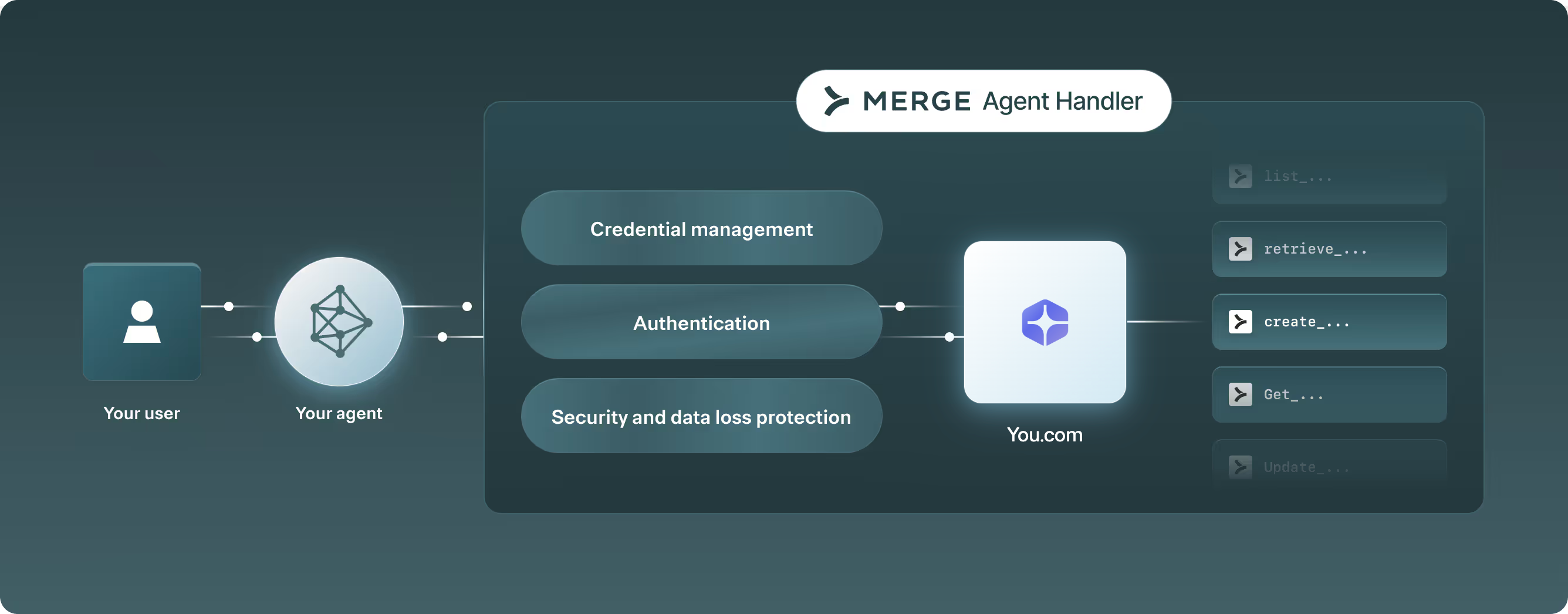
What Shipped: 9 You.com Tools in Merge Agent Handler
The You.com connector exposes nine tools through the Agent Handler MCP server. Most of them map to the You.com Web Search API, which includes the Search API, Research API, and Contents API. The rest handle finance research and account checks.
The tool descriptions tell the model when to use them. The get_answer tool calls our Answer API, run_research calls Research API, and search_web calls the Web Search API. An agent with dozens of tools loaded picks largely from those descriptions, so the routing hints save it from sending a five-hop research question to a one-hop endpoint.
How Merge Agent Handler Differs From You.com in Merge Gateway
This is not the first time You.com has been available through Merge. Merge Gateway, the Merge LLM routing product, already lists You.com as one of six engines behind its hosted web search tool.
In Gateway, the LLM has access to a web search tool, merge:web_search, which can run on You.com. (In Gateway.) A developer who wants You.com specifically has to pin it in the tool parameters:
Without that pin, the engine defaults to auto, and Gateway picks from its list in a fixed order, failing over to the next engine when one times out or returns an error. In that setup You.com is interchangeable infrastructure. The developer may not know which engine answered a given request, and the end user never sees a name. Gateway also exposes search only, with no tool for content extraction, research, or finance.
Agent Handler changes the relationship. An agent can extract a page, run a multi-step research task, or answer a question about a company filing, all through You.com tools it calls by name. Products that run their connector catalog on Agent Handler can list You.com where their users will see it. Developers already using You.com through Gateway don't need to change anything there. The Agent Handler connector is for agents that need more than search results inside a single model call.
Why Merge Agent Handler Matters for Platforms Shipping Web Search
Merge Agent Handler sits between an agent and the systems it calls. A platform groups connectors into Tool Packs scoped to a specific agent or user, and registers each end user so they authenticate on their own. Every call passes through the Merge Security Gateway, which scans inputs and outputs for PII, PHI, payment data, and custom regex patterns, and can allow, redact, or block each match. Calls are logged with their arguments, result, latency, and the user they ran for.
For You.com, the result is reach. Merge builds and maintains the connector, so a company on Agent Handler adds You.com to a Tool Pack the same way it adds Slack or Jira. Its security team reviews web search under controls it has already approved, instead of starting a new vendor integration review. Merge lists Perplexity, Ramp, and JetBrains among the teams using Agent Handler.
On the user side, each person brings their own You.com API key. The key is stored and managed by Agent Handler, and usage bills to that person's You.com account, separate from any Merge charges.
What This Looks Like for End Users
Some companies use Agent Handler to power the connector catalog inside their own product. For their users, You.com shows up in that catalog as a first-class option next to the tools they already connect, with no separate setup page or custom integration behind it.
Take an AI coding agent built this way. A developer working through a framework upgrade can have the agent pull the current migration guide with get_contents, or check a changelog published yesterday with search_web, instead of reasoning from whatever version of the docs its training data happened to include. An analyst using a research assistant on the same platform can ask about a public company's latest filing and get a cited answer from run_finance_research. In both cases the user adds their You.com API key once, through the Merge authentication flow inside the product, and the key stays scoped to that user.
Setting Up the You.com Connector in Merge Agent Handler
If you build on Agent Handler directly, setup takes three steps:
- Create a Tool Pack that includes the You.com connector.
- Create a registered user for the person or agent that will make calls.
- Authenticate that user with their You.com API key.
Agent Handler then gives you an MCP endpoint scoped to that Tool Pack and user. In Cursor, it goes in mcp.json:
There are two credentials here, and they are easy to mix up. The bearer token is your Agent Handler access key. The You.com API key belongs to the registered user and is held by Agent Handler, so it never appears in your agent config. The You.com connector page has equivalent configs for Claude Desktop, Windsurf, and VS Code, which run through mcp-remote.
Once connected, call validate_credential before anything else. It checks the key against the account balance endpoint, so you find out about a bad key before your agent's first real query fails.
Where the Edges Are
A few behaviors will shape how you build around the connector.
- Deep research runs in the background. If you call run_research at the deep, exhaustive or frontier effort levels in background mode you poll via get_research_task or read list_research_events, to check on its status. Event lists can come back truncated, in which case you call again with from_id set to the last ID. Terminal events carry no ID, so the last ID can lag behind the final state.
- Image search is in beta. Expect search_images behavior to change before general availability.
- There are two bills. Agent Handler tool calls draw on your Merge plan. You.com API usage bills separately to the You.com account that owns the key.
Getting Started
If your product already runs on Merge Agent Handler, adding You.com is a Tool Pack change, and your users connect their keys through the same flow they use for every other connector. If you are still evaluating Agent Handler, the You.com connector page lists each tool along with configs for four MCP clients.
Get a free You.com API key and add the You.com connector in Merge Agent Handler.
Sources
Frequently Asked Questions
Merge Agent Handler is a platform for connecting AI agents to third-party tools over MCP. It provides per-user authentication, scoped Tool Packs, data-loss scanning on tool inputs and outputs, and a log of every tool call.
In Merge Gateway, You.com is one of several engines behind a single web search tool, chosen automatically unless a developer pins it. In Merge Agent Handler, You.com is a named connector with nine tools, including research and content extraction, that users connect with their own key.
Add the You.com connector to a Tool Pack, create a registered user, and authenticate that user with a You.com API key. Then point your MCP client at the endpoint for that Tool Pack and user.
Yes. Each user brings their own key, and You.com usage bills to that account separately from Merge.
Yes. If your product uses Merge Agent Handler to run its connector catalog, you can add You.com to the Tool Packs your users see, and they connect it with their own key.
LI Test
LI Test
Share Article:
Related resources.

Scira Now Uses the You.com Web Search API as Its Default Search Provider
October 29, 2026
Blog

The You.com Paperclip Connector Brings Live Web Search to Every Agent in Your Org
October 15, 2026
Blog

The You.com Sim Integration Brings Eight Web Search API Tools to Visual Agent Workflows
October 14, 2026
Blog


Pydantic AI and You.com—Delivering Powerful Web Intelligence and Agent Orchestration
August 27, 2026
Blog